
Next Gen Hub
Microsoft Edge is a web browser developed by Microsoft.
Hub is the one place for user to save their favorite websites.
Minmin brought up the idea to expand the use of hub.
Since user might not only want to save their favorite website,
but also something else.

My Role
concept thinking, UX flow, wireframe, design and prototype by Minmin Shi,
Minmin was involved in a series of concept brainstorming show in Microsoft Edge team,
Minmin not only bring wireframes like everyone else,
she also quickly design and make prototypes to present her ideas.
She later expanded one of her favorite idea to this passion project,
Question
How do we make save favorites experience more efficient and delightful?
How to make hub easier to navigate and easier to organize?

Problem
Save Favorite
1. Favorite website in the hub is hard to navigate because there are only list of favicon, names and url.
2. User might only want to save individual item on the website instead of the whole website,
such as image, video, quotes, or even shopping cart,
3. if they save individual item to their local, it's less efficient.
4. It's also hard to share with other user with the favorite list.
Meet the Users

Nataly Osmann
Fashion Blogger
Painpoint
Nataly creates contents on social media, she take fashion photos, write articles about the new fashion trends, make videos,
she searches multiple types of medias in the browser for influnece.
-
when she research for images, articles, videos, she can't save them in one place and organize them easily.
-
after saving to local, she can't trace back the original URL unless she repeat the search.
-
She purchase stuff from too many different websites, it's hard to track every order from so many places, she sometimes saved item in cart but later forgot which website she saved to.
Goals
-
Nataly want to effortlessly save all the media, photos, article, quotes in one place, and organize them efficiently.
-
She want to have a place to track all her orders from multiple websites,
-
have a place to save all the stuff she wanted to purchase and purchase in one place instead of going to multiple websites.

James Bamford
Homeowner
Painpoint
James is renovating his new home, he search existing home improvement ideas online.
He works with contractors, share his ideas with them for construction.
His wife would also send him list of construction materials to purchase.
-
it's hard to share his photos with contractors, sometimes need to add comments to the reference image, but it's complicated to do so
-
Every time he gets a long list of items to purchase from his wife, he has to click into each list and purchase from multiple websites, he sometimes even missed a few because it's hard to organize.
Goals
James want to share the ideas with contractors easily. able to comment on the ideas.
He want to be able to save all the shopping list from multiple website at one place so that his wife could share the shopping list with him effortlessly
He want to be able to purchase items at one place instead of getting lots of links

Linda Eliasen
Illustrator & Designer
Painpoint
Linda makes graphic design and illustration, she research existing art work for influence,
She also look for assets to be used in her design, she has a large library of images.
She need to share her ideas with other colleagues
-
Linda uses browser heavily for image searching,
-
saving images needs too many clicks and choosing folders.
-
It's hard to navigate, or find the original URL where she saved the image
Goals
Linda wants to be able to save lots of images with minimal steps possible,
she want to organize the images easily and share with colleague
she want to save groups of images effortlessly
She want to see similar types of images
Goals

Minimum Steps
Use minimum clicks to save the item

Informational
user could get more info from the saved item

Easy to Organize
easy to organize after saving

Clear to Navigate
use image more instead of text and favicon for saving favorites

Convenient to Share
share with people without huzzle

Everything in One Place
could save image or video or quotes in one board
Challenges
1. It's challenging to find a way to save the item to the desired location with minimum clicks,
2. With minimum steps, it's challenging to make it clear where user's item is saved to.
3. It's challenging to make the feature more discoverable but yet not too disturbing.
Solution
1. Use drag & Drop, trigger a list of buckets on the side of the browser when user are trying to drag and drop the image to their local, it helps to make the feature more discoverable,
user could also make the select, choose location and save in one click with drag & drop.
2. Save the image, video or quotes in the browser and keep the original URL when user open it, so they could trace back to the original website when they want to.
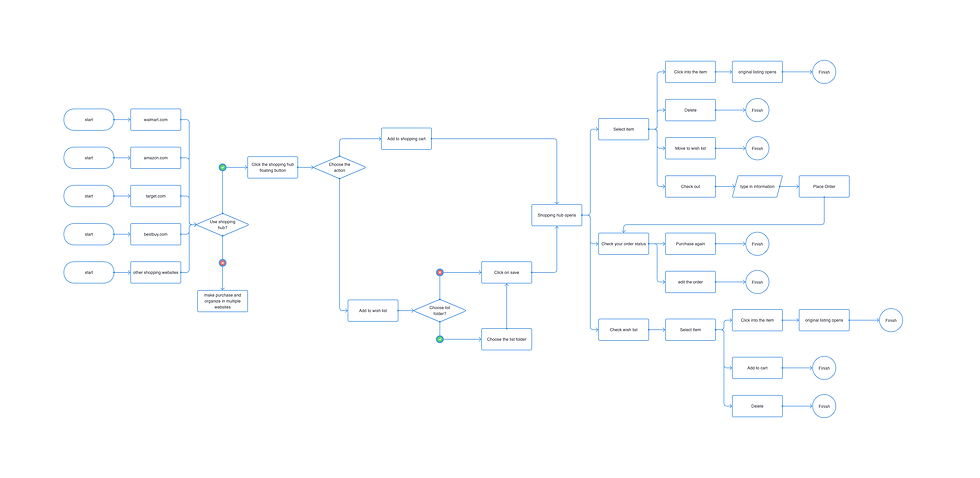
3. Adding a pop up dialogue asking user to save all the products they wanted to purchase in one place,
instead of managing cart and orders from many websites, user could manage and purchase at one place.
User Flow
Next Gen Hub Experience

Universal Shopping Experience
Wireframes
.


Prototype
prototypes made quickly to share the idea
They were design and animated within a few hours to present my idea, so a bit rough
Drag&Drop to save Images in the Hub
Universal Shopping Experience

Compatitive analysis
Use minimum clicks to save the item